J1772 to NACS Adapter: What Works with Tesla (And What Doesn't)
If you're a Tesla owner who just bought a J1772 charging station or portable charger, you've probably encountered this confusing moment: Which adapter do I need?
Amazon reviews tell the story:
"This charger does not come with a Tesla adapter if you plan on using it for the Tesla."
"You cannot use a large NACS adapter that does DC->NACS like you would use at an L3, you must use the little round J1772 -> NACS adapter."
"Prior attempts with the large DC CCS adapter resulted in charging failures."
The confusion is real—and costly. Buy the wrong adapter, and you've wasted $150+ on a product that physically won't work with your home charger.
In this guide, we'll break down exactly which J1772 to NACS adapter works for home and portable charging, why the "big" adapter doesn't work, and how to avoid common mistakes.
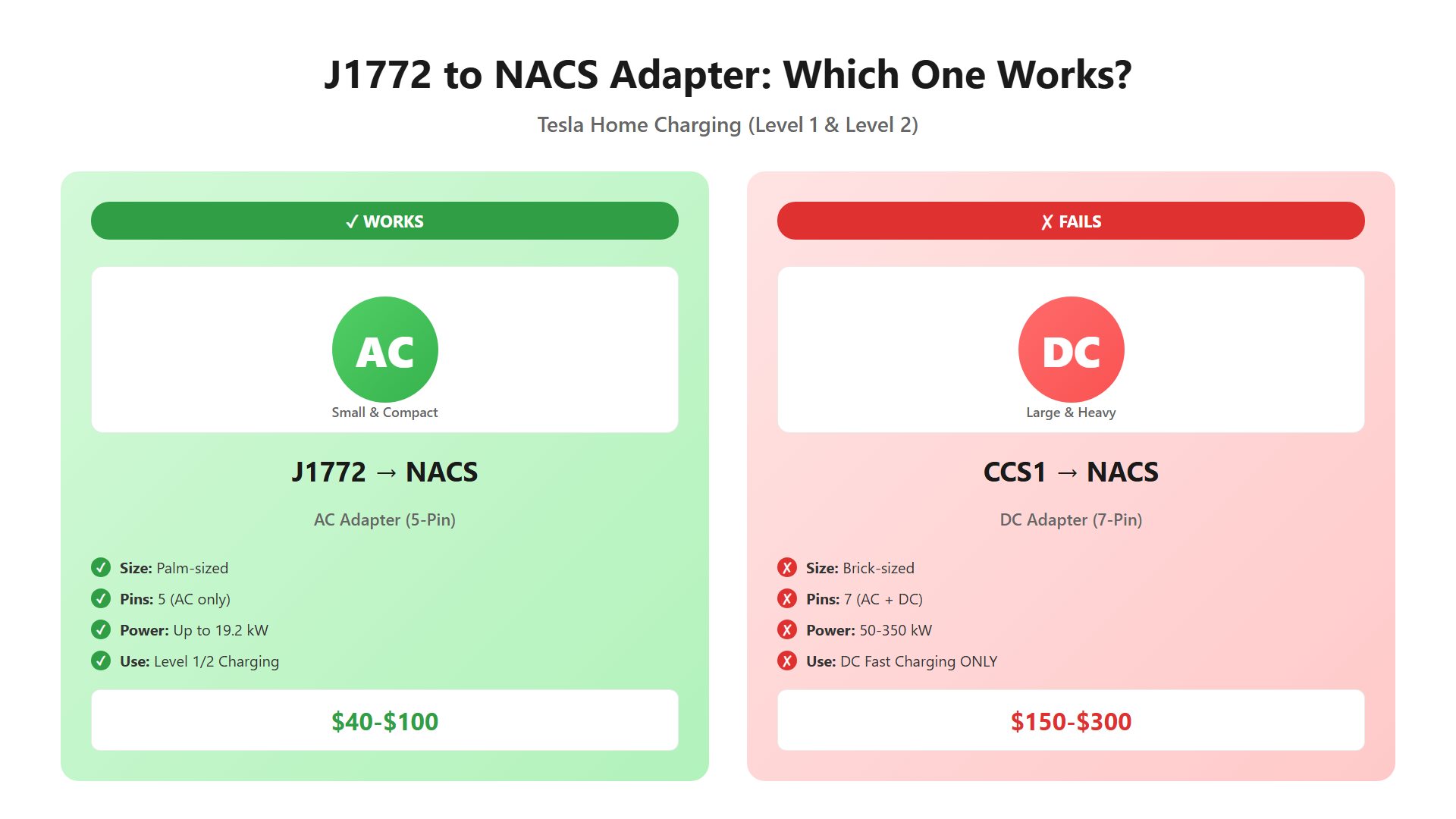
The small AC adapter (left) works with home chargers. The large DC adapter (right) doesn't.
The Two Types of NACS Adapters (And Why It Matters)
Here's the key point most people miss: There are two completely different types of NACS adapters, designed for two completely different charging scenarios.
✅ Type 1: J1772 to NACS Adapter (AC Charging)
What it looks like:
- Small, compact (about the size of your palm)
- Round shape with 5 pins
- Lightweight (under 1 lb)
What it's for:
- Level 1 charging (120V)
- Level 2 charging (240V, up to 19.2 kW)
- Home wall chargers
- Portable EV chargers
- Destination chargers (hotels, shopping centers)
Power rating: Up to 80A / 19.2 kW
Price range: $40-$100 (aftermarket), $50-$80 (Tesla OEM)
This is the one you need for home charging setups.
❌ Type 2: CCS1 to NACS Adapter (DC Fast Charging)
What it looks like:
- Large, bulky (size of a brick)
- Heavy (2-4 lbs)
- Built-in cooling channels
- Two extra DC pins at the bottom
What it's for:
- DC fast charging only (Level 3)
- Public CCS1 fast charging stations
- 50-350 kW charging speeds
Power rating: 50-350 kW
Price range: $150-$300+
This will NOT work with your J1772 home charger, even though it physically might fit.
Why the DC Adapter Doesn't Work for Home Charging
Here's the technical reason:
J1772 chargers deliver AC power through 5 pins (SAE J1772 standard):
- 2 AC power pins (L1, L2)
- 1 ground pin
- 1 proximity detection pin
- 1 control pilot pin
CCS1 to NACS adapters are designed for DC power through 2 extra pins at the bottom of the connector. They don't route the AC pins because DC fast chargers don't use them.
When you plug a CCS1-to-NACS adapter into a J1772 charger:
- ❌ The AC pins have no path to the vehicle
- ❌ The car can't detect the charger
- ❌ Charging fails, error code displayed
It's like trying to use a USB-C to HDMI adapter for power delivery—wrong protocol, wrong wiring.
Comparison Table: J1772→NACS vs CCS1→NACS
| Feature | J1772 to NACS (AC) | CCS1 to NACS (DC) |
|---|---|---|
| Size | Small (palm-sized) | Large (brick-sized) |
| Weight | < 1 lb | 2-4 lbs |
| Charging Type | AC only (Level 1/2) | DC only (Level 3) |
| Power Rating | Up to 19.2 kW | 50-350 kW |
| Compatible With | ✅ Home chargers<br>✅ Portable chargers<br>✅ Destination chargers | ✅ DC fast charging stations<br>❌ Home chargers |
| Pins | 5 (AC + control) | 7 (AC + 2 DC) |
| Price | $40-$100 | $150-$300 |
| Typical Use | Daily home charging | Road trips, emergency fast charging |
| Includes with Tesla | ✅ Yes (since 2020) | ❌ No (sold separately) |
Bottom line: If your charger is J1772 (the standard round connector), you need the small AC adapter. The large DC adapter is physically incompatible.
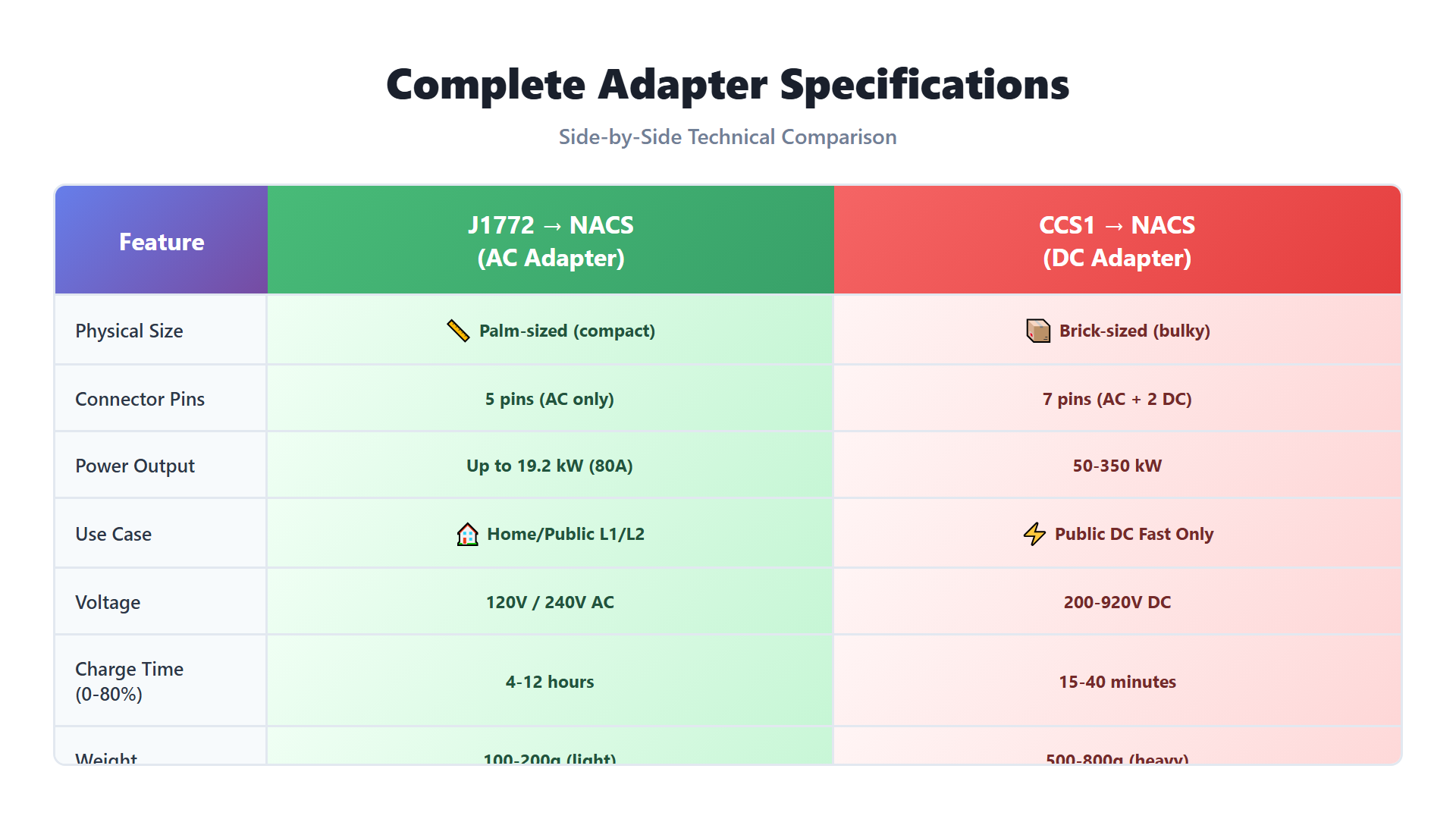
Complete adapter specifications comparison table
Which Adapter Do You Need? (By Use Case)
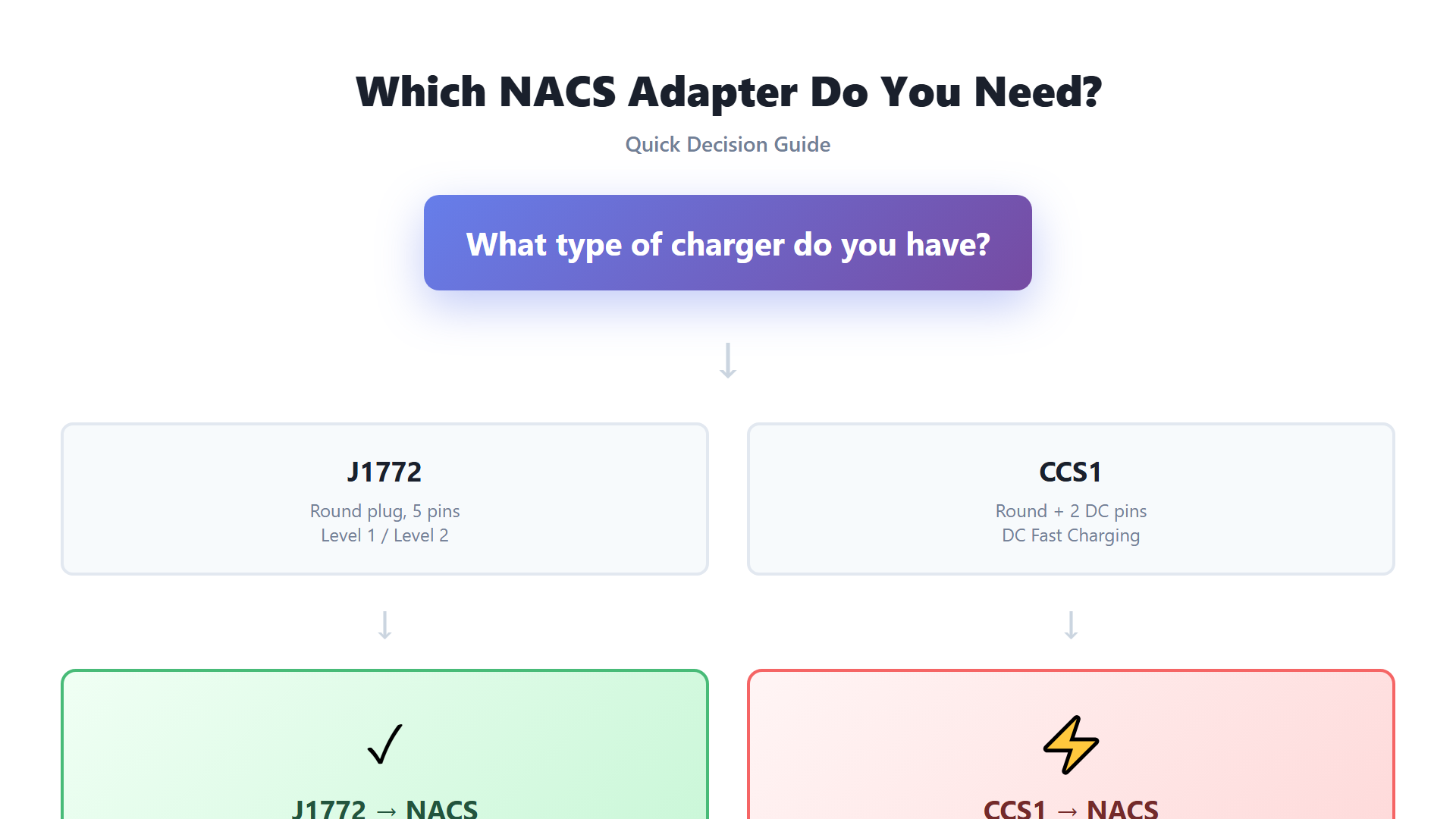
Adapter selection flowchart - J1772 vs CCS1 decision guide
Scenario 1: Home Level 2 Wall Charger (J1772)
You have: A wall-mounted J1772 charger (ChargePoint Home, JuiceBox, ClipperCreek, etc.)
You need: J1772 to NACS (AC) adapter
Why: Your wall charger delivers AC power at 240V. The small adapter routes AC pins correctly.
Power delivery: 7.7 kW (32A) to 19.2 kW (80A), depending on your charger's rating.
Scenario 2: Portable EV Charger (J1772)
You have: A portable Level 2 charger with J1772 plug (like the EVDANCE unit from the Amazon review)
You need: J1772 to NACS (AC) adapter
Why: Portable chargers are AC devices, delivering 16A-40A at 240V.
Bonus tip: Tesla includes this adapter with every vehicle sold since 2020. Check your center console or glovebox—you might already have it.
Scenario 3: Public DC Fast Charging Station (CCS1)
You have: Access to a CCS1 DC fast charging station (Electrify America, EVgo, etc.)
You need: CCS1 to NACS (DC) adapter
Why: DC fast chargers bypass the onboard AC-to-DC converter and deliver DC directly to the battery.
Power delivery: 50-350 kW, charges 10-80% in 20-45 minutes.
Note: Tesla is rolling out native NACS connectors at Supercharger stations. By 2025, most DC charging won't require adapters.
Scenario 4: Destination Chargers (Hotels, Shopping Centers)
You have: Access to a J1772 destination charger
You need: J1772 to NACS (AC) adapter (the small one)
Why: Destination chargers are Level 2 AC chargers, same as home units.
Power delivery: 6.6-11 kW typical.
Buying Guide: OEM vs Aftermarket Adapters
Tesla OEM J1772 to NACS Adapter
Pros:
- ✅ Guaranteed compatibility
- ✅ Warranty coverage
- ✅ Tested to Tesla's quality standards
- ✅ Comes free with vehicle (2020+)
Cons:
- ❌ More expensive ($80)
- ❌ Limited availability (often out of stock)
Where to buy: Tesla Shop, Tesla Service Centers
Aftermarket J1772 to NACS Adapters
Pros:
- ✅ Lower cost ($40-$60)
- ✅ Widely available (Amazon, AliExpress, EV accessory stores)
- ✅ Multiple brand options
Cons:
- ❌ Quality varies by manufacturer
- ❌ Some lack proper certifications
- ❌ May not fit as snugly as OEM
What to look for:
- UL or ETL certification (UL EV charging safety standards)
- 80A rating (future-proof)
- IP54+ rating (weather-resistant)
- Customer reviews mentioning Tesla compatibility
Recommended brands:
- Lectron (80A, UL Listed, $60)
- A2ZEV (80A, ETL Listed, $55)
- GearIT (40A, ETL Listed, $45)
Avoid:
- No-name brands without certifications
- Adapters with "Universal EV" claims but no specific Tesla compatibility
- Prices under $30 (likely poor contact quality)
Common Mistakes (And How to Avoid Them)
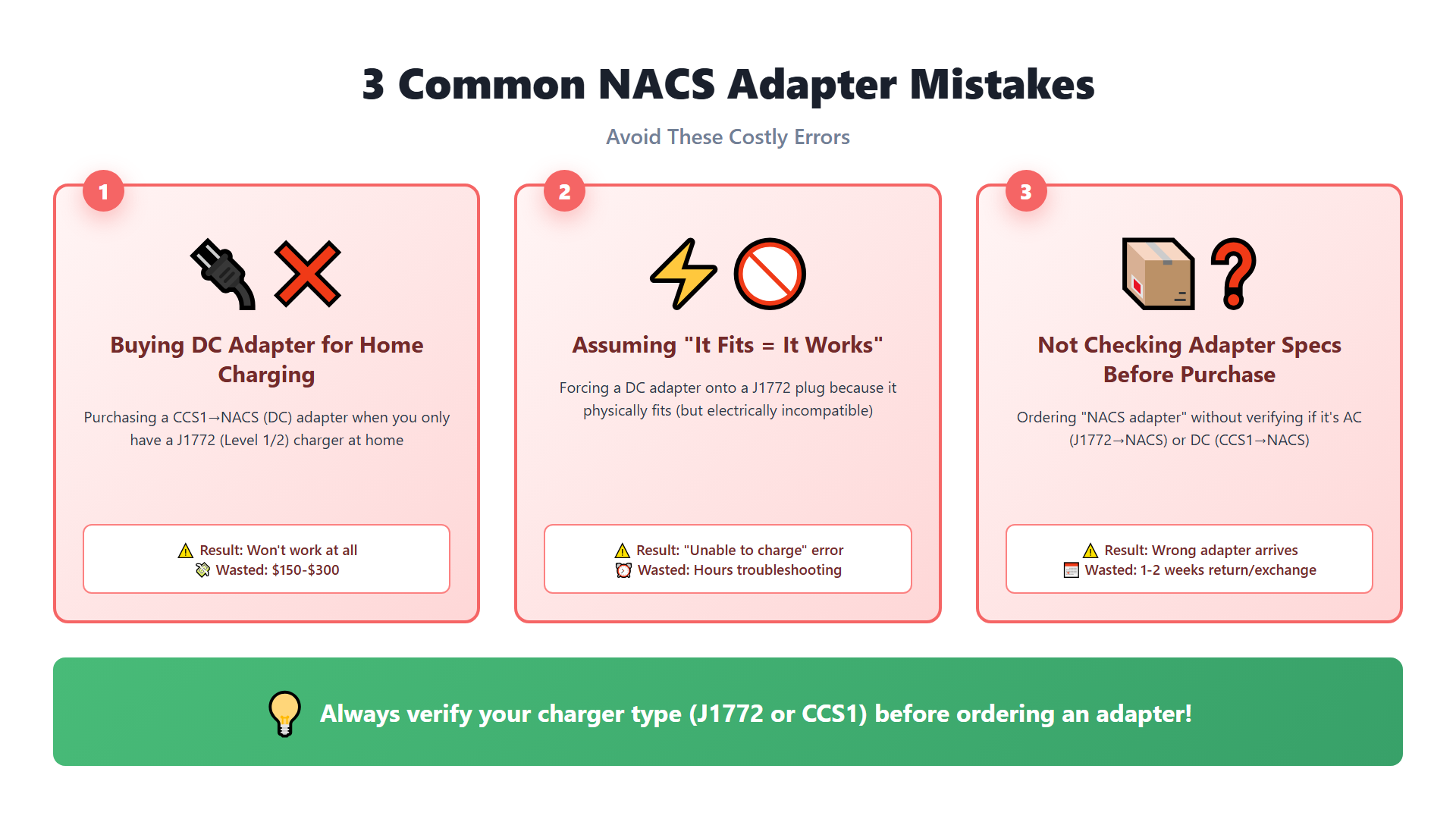
Common NACS adapter mistakes to avoid|637
❌ Mistake 1: Buying a CCS1 Adapter for Home Charging
What happens: You spend $150-$250 on a large DC adapter, plug it into your J1772 home charger, and get an error code.
Why it fails: DC adapters don't route AC pins. Your charger can't communicate with the car.
How to avoid: Check the product description. If it mentions "DC fast charging," "CCS1," or "Level 3," it's the wrong adapter for home use.
❌ Mistake 2: Not Checking Certification
What happens: You buy a cheap $25 adapter from an unknown brand. It overheats during charging or causes intermittent connection issues.
Why it fails: Poor contact quality, inadequate heat dissipation, or counterfeit certifications.
How to avoid: Only buy adapters with UL or ETL certification. Check reviews for mentions of "overheating" or "loose connection."
❌ Mistake 3: Assuming "Universal" Means Compatible
What happens: You see "Universal EV Adapter" and assume it works with Tesla.
Why it fails: Some adapters are designed for older Tesla models (pre-2020) or only work one direction (Tesla → J1772, not J1772 → Tesla).
How to avoid: Look for specific mention of "J1772 to NACS" or "J1772 to Tesla." Verify the connector orientation in product photos.
❌ Mistake 4: Using a Damaged or Worn Adapter
What happens: Your adapter worked fine for a year, then starts causing charging errors or slow speeds.
Why it fails: Contact pins wear out, especially if you plug/unplug frequently. Corrosion from outdoor use can also degrade connections.
How to avoid:
- Inspect pins every 3-6 months
- Replace if you see discoloration, pitting, or looseness
- Store indoors when not in use
- Apply dielectric grease annually (optional, for outdoor use)
FAQ
Can I use Tesla's included adapter with any J1772 charger?
Yes. The J1772 to NACS adapter that comes with your Tesla (2020+) works with any standard J1772 charger, including:
- Home Level 2 wall chargers
- Portable EV chargers
- Destination chargers
- Workplace charging stations
Power limit: Up to 80A / 19.2 kW, depending on your vehicle's onboard charger capacity.
Why doesn't my large CCS adapter work with my home charger?
Because your home charger delivers AC power, and the CCS1 to NACS adapter only routes DC power pins.
Think of it like trying to charge your phone with an HDMI cable—wrong protocol, wrong wiring. The physical connector might fit, but there's no electrical path for the power to flow.
Are third-party J1772 to NACS adapters safe?
Yes, if they're certified. Look for:
- UL or ETL certification mark
- 80A rating (even if your charger is only 32A-40A)
- IP54+ rating for outdoor use
- Positive reviews from verified Tesla owners
Avoid adapters without certifications or from unknown brands. Overheating and poor connections are common failure modes.
Do I need an adapter for Tesla Superchargers?
No. Tesla Superchargers have native NACS connectors. Just plug in directly.
For non-Tesla DC fast chargers (Electrify America, EVgo), you'll need a CCS1 to NACS adapter—but that's a different product than the J1772 adapter discussed in this article.
Can I use the same adapter for both Level 1 and Level 2 charging?
Yes. The J1772 to NACS adapter works for both:
- Level 1 (120V, 12-16A)
- Level 2 (240V, 16-80A)
The adapter itself doesn't limit power—it just routes the pins. Your vehicle's onboard charger determines the actual charging speed.
What if my adapter gets hot during charging?
Slight warmth is normal. The adapter carries significant current (30-40A typical), so expect it to be warm to the touch.
Concerning signs:
- ❌ Too hot to touch (>140°F / 60°C)
- ❌ Discolored or melted plastic
- ❌ Burning smell
- ❌ Intermittent connection (charging starts/stops)
If you notice these, stop using the adapter immediately. Inspect for:
- Corroded or pitted pins
- Loose connections
- Dirt or debris in the connector
Replace if damaged. For outdoor use, apply dielectric grease to prevent corrosion.
OEM Considerations: Private Label Adapters
If you're a distributor or reseller considering private-label adapters, here's what to know:
Minimum Order Quantity (MOQ):
- 100-500 units (varies by manufacturer)
- Lower MOQs available for established brands
Certification requirements:
- UL 2251 (EV charging adapters)
- ETL Listed (alternative to UL)
- FCC Part 15 (EMC compliance)
Lead time:
- Tooling: 30-45 days (if custom branding)
- Production: 15-30 days
- Certification: 60-90 days (first-time)
Price structure:
- 100 pcs: $25-$35/unit
- 500 pcs: $18-$28/unit
- 1000+ pcs: $15-$22/unit
Quality checkpoints:
- Contact resistance: < 1 mΩ
- Insertion/removal force: 30-80 N
- Temperature rise test: < 30°C above ambient at rated current
- Dielectric strength: 2000V AC, 1 minute
At PearlGate, we work with certified adapter manufacturers in Dongguan and Shenzhen. We can arrange factory audits, sample testing, and certification support for private-label projects.
Conclusion
The confusion around J1772 to NACS adapters is understandable—there are two completely different products with similar names but incompatible functions.
Here's the takeaway:
✅ For home charging (Level 1/2, J1772 chargers): → You need the small J1772 to NACS (AC) adapter → Price: $40-$100 → Tesla includes one with every vehicle (2020+)
❌ The large CCS1 to NACS (DC) adapter does NOT work for home charging, even if it physically fits. It's designed for DC fast charging stations only.
Before you buy:
- Confirm your charger type (J1772 = AC, CCS1 = DC)
- Check for UL/ETL certification
- Read reviews from Tesla owners
- Verify 80A rating for future-proofing
Already have the wrong adapter? Return it if possible, or keep it for future road trips when you need DC fast charging access.
Need Help Sourcing EV Charging Equipment?
At PearlGate, we help overseas buyers source certified EV charging products from verified Chinese manufacturers, including:
✅ J1772 to NACS adapters (OEM and private label)
✅ Portable EV chargers (dual-voltage, UL/CE certified)
✅ Level 2 wall chargers (7.7-19.2 kW)
✅ Charging cables and accessories
Services:
- Factory verification and audits
- Certification support (UL, ETL, CE, TÜV)
- OEM customization (MOQ 100-500 units)
- Quality control and pre-shipment inspection
📩 Submit an inquiry or browse our EV charging product catalog.
Related Articles:
- CCS1 vs CCS2: Connector Differences Explained
- Why 120V EV Charging is So Slow (And When to Upgrade)
- NACS Charging Standard: Complete Guide for Buyers
Last updated: June 5, 2026
Sourcing EV Charging Equipment from China?
I'm based in the Pearl River Delta with 12 years of supply chain experience. I help buyers find verified EV charging manufacturers, verify certifications, and coordinate factory visits.
Subscribe for more guides like this
Get sourcing tips and new factory alerts. Free, no spam.
No spam. Unsubscribe anytime.